
Blog
Tech Guide: Volvo & Mack CAN 2 Data Link Initialization
Precision multiplex component diagnostic guidelines for commercial fleet stations.
Dealing with stubborn connection drops or dead communication responses when scanning air brakes? Learn the professional technical sequence to configure your Nexiq USB-Link 2 with the 519062 adapter.
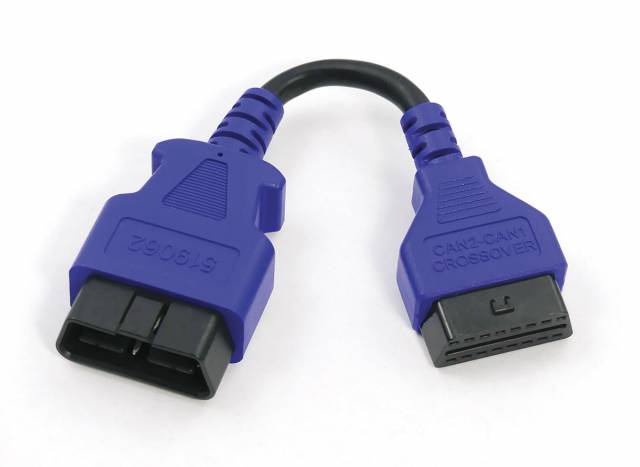
Why Standard Deutsch Adapters Misread Secondary CAN Channels
The standard 9-pin OBD ports found under heavy truck dashboards feature a set pin configuration meant for central data feeds. However, when manufacturers began piping secondary active safety parameters—like lane departure cameras and anti-lock trailer braking loops—onto separate CAN channels, standard reader links couldn't keep pace. If a line technician tries to force a diagnostic test using a generic, un-crossed Deutsch adapter, the PC interface will return a false "Module Offline" diagnostic tree. This missing link can mislead a tech into thinking they need to replace an expensive WABCO ABS computer or wire harness. Utilizing the Nexiq 519062 crossover adapter physically jumps the hidden auxiliary pin signals over to the primary read lines, letting your diagnostic software communicate seamlessly with the system.
The 5-Step Data Link Connection Protocol
- Vehicle Network and Port Audit: Park the commercial tractor securely on flat shop ground. Set the parking air brakes and toggle the ignition key to the complete "OFF" or resting state. Clean the dashboard's internal OBD diagnostic connector port to clear away dust or debris.
- Assemble the Diagnostic Stack: Connect your main **Nexiq 124032 USB-Link 2** or 3 translator box to your shop laptop data terminal. Thread the Nexiq 519062 CAN2-to-CAN1 crossover adapter cable inline directly onto the 9-pin end of your master translator unit.
- Seat the Port Connections: Guide the male end of the 519062 crossover adapter cable straight into the truck's dashboard diagnostic port terminal cavity. Twist the outer locking barrel clockwise until it snaps firmly into place to guarantee steady contact during test cycles.
- Power Up and Initialize Software: Cycle the vehicle's ignition key forward to the "RUN" position without starting the heavy engine. Launch your dedicated truck diagnostic suite (such as Volvo Premium Tech Tool or WABCO Toolbox) and run an auto-scan cycle.
- Execute Diagnostic Fault Trees: Read the newly unlocked ABS live data stream link parameters. Clear old historic codes, monitor active wheel speed sensor voltage outputs, or flash fresh brake configurations safely. Once complete, turn off the key before unhooking the diagnostic cable stack.
PRO-TECH COMMUNICATION SECURITY RULES:
Always ensure that the physical link contacts are fully seated and completely locked before initiating any electronic module programming or ECM flashing procedures over the data line! A loose cable bump mid-flash can drop connection paths abruptly, which can permanently corrupt or "brick" the truck's expensive ABS or engine controller module.
Class 8 Fleet Data Precision. Clear Communication Faults Fast.
Get Your Nexiq 519062 Crossover Cable
overall rating:
my rating:
log in to rate