
Blog
Cummins ISX Counterbore Depth Calibration Steps
Precision tool calibration and engine block counterbore setup guidelines for commercial diesel mechanics and machine shops.

Calibrating counterbore cutter systems or dial depth gauges on a Cummins ISX engine block? Follow this step-by-step professional workshop procedure to clean reference surfaces, zero depth indicators on the M50146 setting master, verify bit depth settings, and execute precision counterbore cuts for exact liner protrusion.
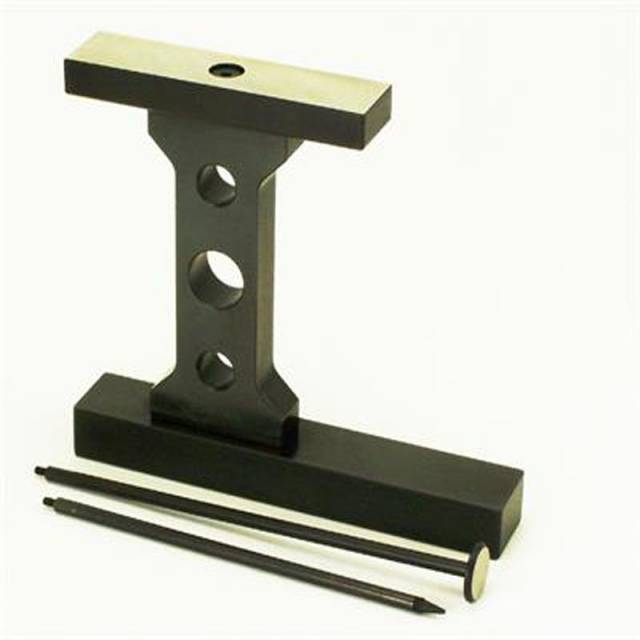
Why Zeroing on Raw Engine Decks Causes Machining Inaccuracies
On Cummins ISX engines, counterbore machining removes precise amounts of cast iron from worn liner seats so stainless steel shims can restore factory liner protrusion. However, many technicians make a critical error during setup: zeroing their dial indicator or cutter assembly directly on an unmachined engine deck. Used engine decks suffer rust pitting, carbon staining, microscopic fretting burrs, and minor deck warpage. Zeroing a depth gauge on a high spot or pitted area introduces immediate calibration error. If the gauge reads 0.002 inches off from the true deck plane, every counterbore cut across all six cylinders will inherit that exact error. Over-machined counterbores drop liners too low, resulting in blown head gaskets, while under-machined counterbores crack liner flanges upon head bolt torque. Utilizing the 4.00-pound M50146 Setting Master eliminates deck calibration errors completely. Manufactured from hardened alloy steel with mirror-lapped reference surfaces, the M50146 provides an absolute, unyielding zero point, guaranteeing that every depth measurement and counterbore cut matches OEM specs perfectly.
The 5-Step Depth Master Calibration & Counterbore Setup Protocol
- Clean M50146 Master & Indicator Contact Tips: Wipe the lapped faces of the M50146 setting master and the contact tip of your dial depth indicator with solvent and a lint-free cloth. Ensure zero oil, dust, or metal particles are trapped on reference faces.
- Place Depth Assembly onto M50146 Setting Master: Set your dial depth gauge or cutter assembly squarely onto the M50146 setting master reference surface. Ensure the base rests completely flat without rocking.
- Zero the Dial Indicator: Rotate the dial bezel or zero the digital readout on the indicator until the needle aligns exactly with "0". Lock the bezel screw to secure the zero reference point.
- Mount Cutter Assembly on Cummins ISX Block: Move the calibrated depth gauge or cutter plate (such as the M50145 or M50159) onto the target cylinder of the Cummins ISX engine block deck. Anchor the cutter base firmly per tooling instructions.
- Execute Machining Pass & Verify Final Depth: Advance the carbide cutting bit to the target cut depth based on your zeroed reference. Machine the counterbore ledge, clean filings, and verify the finished counterbore depth with the calibrated dial gauge before selecting shims.
PRO-TECH CLEANLINESS & CALIBRATION VERIFICATION MANDATE:
ALWAYS CLEAN REFERENCE SURFACES WITH SOLVENT BEFORE ZEROING! Even microscopic dust or oil films WILL alter dial gauge zeroing by thousandths of an inch! ALWAYS RE-VERIFY ZERO ON THE M50146 MASTER after completing every 2-3 cylinder cuts to ensure tool vibration has not shifted indicator settings!
4.00 lbs Precision Hardened Alloy Setting Master. Protect Cummins Overhauls.
Get the M50146 Setting Master Now
overall rating:
my rating:
log in to rate